I'm trying to develop for Unreal Engine, so I upgraded from Visual Studio 2022 to 2026 edition and upgraded the engine to 5.7, but now a lot of what was defined in the engine like the "Core/Minimal.h" file aren't being included properly and most cpp and h files are giving E1696 errors. From another forum question's response, I tried clicking retarget solution under the project header, and I think the window might have appeared for that once, but if that's what it was it went away when I clicked elsewhere and now it won't show up again. I might have altered some engine property settings, but I thought I replaced them and don't know why that would cause an obstacle here anyway. I had followed the programming quick start guide at https://dev.epicgames.com/documentation/en-us/unreal-engine/unreal-engine-cpp-quick-start?application_version=5.5 to make a floating cube, which worked, and I replaced the text in the file to reference different shapes in Unreal's shape folder, which did update the shape of the actor, but now that I'm looking under the hood again and trying to repeatably update details in the files and reflect them to the engine, the whole project is throwing errors that I don't think I caused, and it looks like the biggest one is that it's not recognizing and including the standard UE and UE generated header files that I can still open and have in another tab as shown in this picture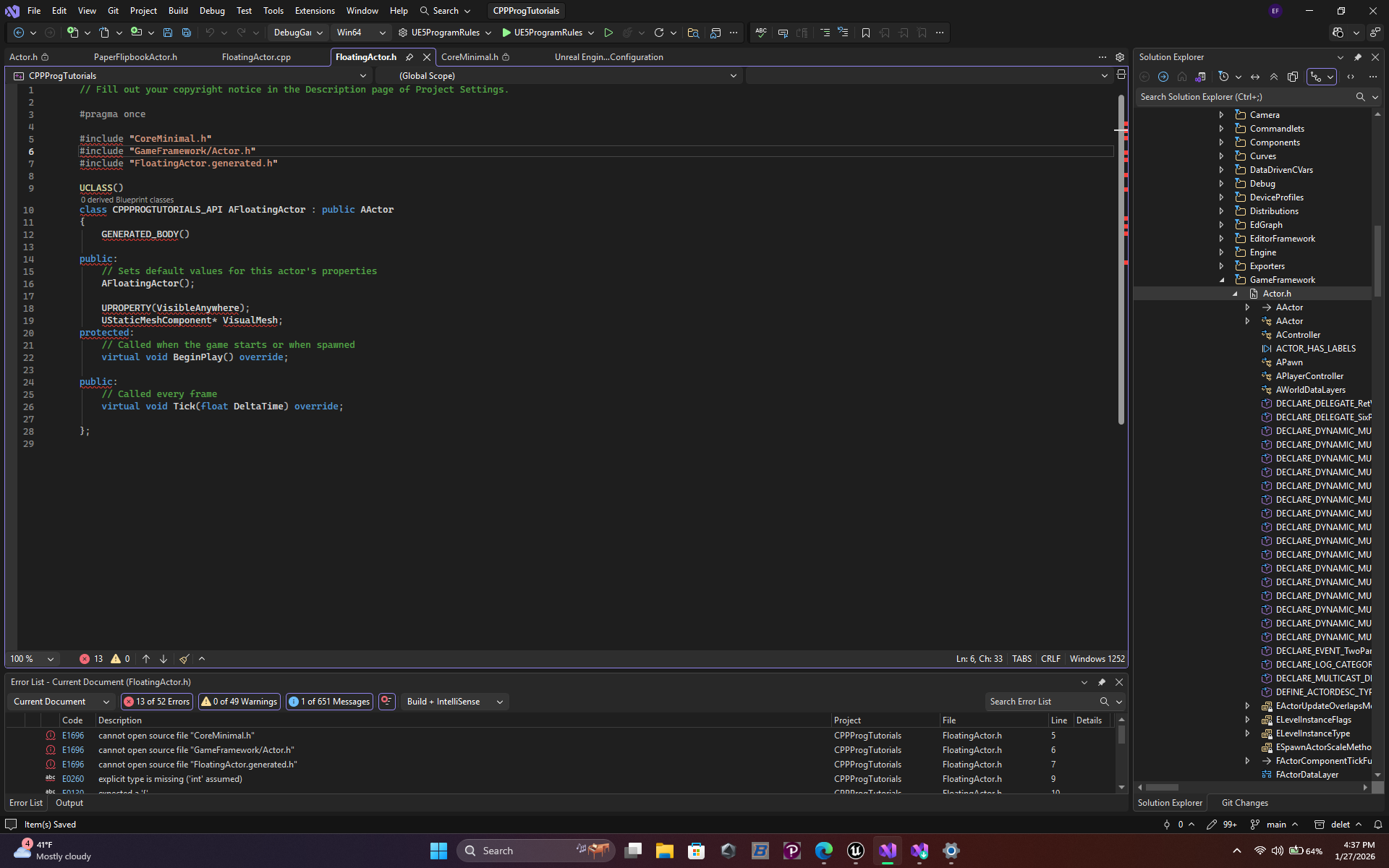
PS If this is the wrong tag and/or child tag to post this question under, please let me know. All of my questions will probably be specific to programming for UE
' cx='32' cy='32' r='32' /%3E%3Ctext x='50%25' y='55%25' dominant-baseline='middle' text-anchor='middle' fill='%23FFF' %3EEF%3C/text%3E%3C/svg%3E)
' cx='32' cy='32' r='32' /%3E%3Ctext x='50%25' y='55%25' dominant-baseline='middle' text-anchor='middle' fill='%23FFF' %3EHV%3C/text%3E%3C/svg%3E)